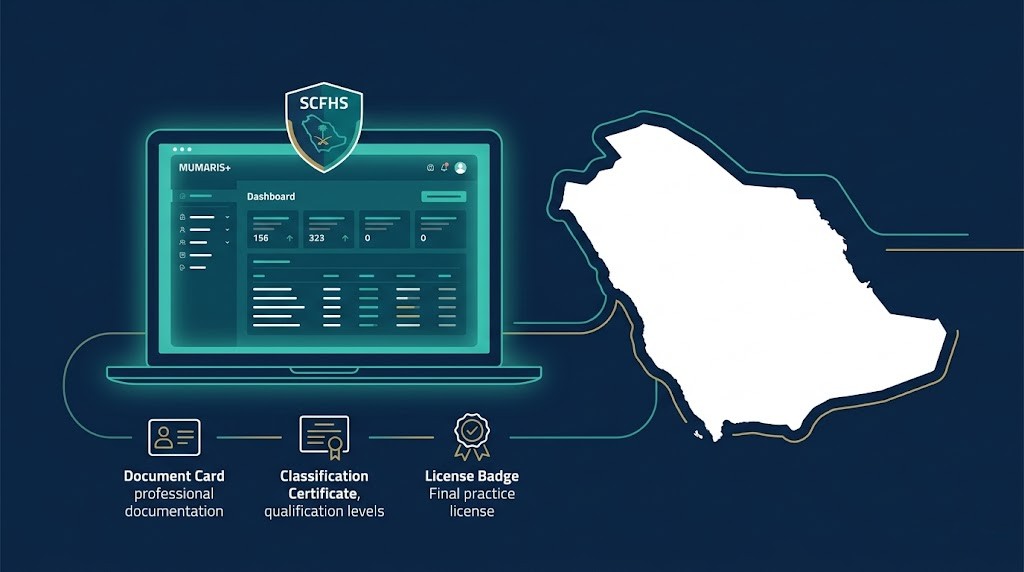
Mumaris+ is the SCFHS portal where every stage of your Saudi healthcare licence happens — from Professional Classification to exam eligibility, Professional Registration, and renewal. First-time applicants can start from outside Saudi Arabia. Registration requires a valid Iqama. Total cost runs SAR 2,500–4,000 depending on profession. Message us on WhatsApp for a free eligibility check before you begin.
Most applicants open Mumaris+ expecting a straightforward form. What they find instead is a portal managing five separate stages, three possible exam types, and profession-specific rules that no single screen explains. That confusion causes delays — not the process itself.
This guide walks you through the Mumaris+ registration process in the correct sequence, with the official SCFHS timelines, current fees, and the profession-specific differences that most articles skip entirely. Whether you’re applying from outside Saudi Arabia or returning after a gap, the steps below apply to you.
What Is the SCFHS Mumaris+ Portal and Who Needs to Register?
Mumaris+ is the SCFHS online platform where all Saudi healthcare licensing happens: classification, registration, exams, and renewal.
Three terms that often get confused: SCFHS is the Saudi Commission for Health Specialties — the regulatory authority that governs all healthcare practice in the Kingdom. Mumaris+ is the portal SCFHS built to manage every licensing service digitally. DataFlow is a separate primary source verification (PSV) company that SCFHS contracts to authenticate your credentials — DataFlow runs inside Mumaris+ but it’s a different entity entirely.
Every healthcare professional who wants to practise legally in Saudi Arabia must register through Mumaris+. That includes doctors, nurses, pharmacists, dentists, and allied health professionals — regardless of whether you’re applying for the first time or returning after working elsewhere. You can read more about the full SCFHS licensing process for Saudi Arabia on our country page, which covers the broader licensing landscape beyond the portal itself.
Classification vs Registration — What’s the Difference?
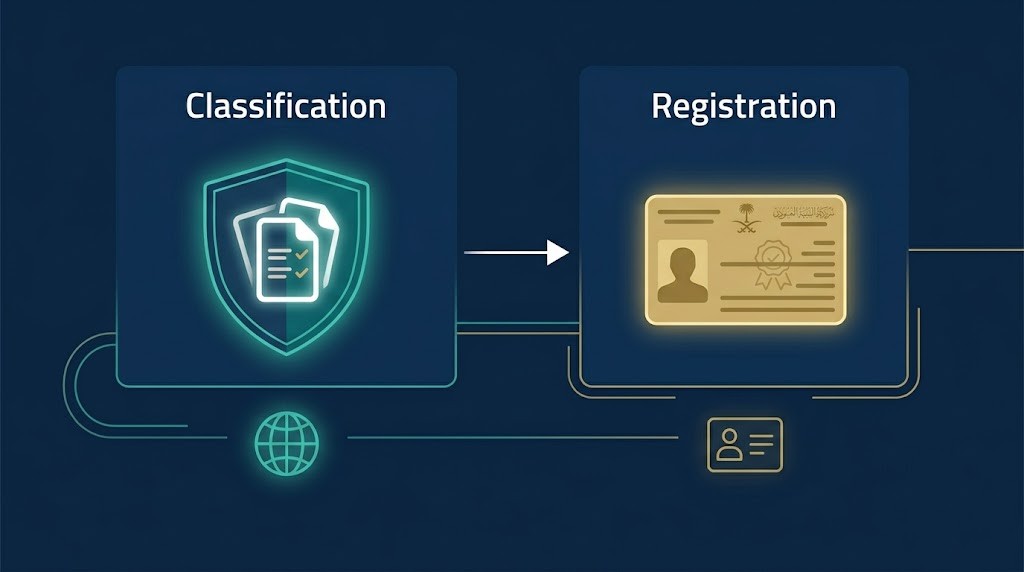
Classification verifies your credentials and grants exam eligibility. Registration is the active Saudi licence and requires a valid Iqama to complete.
This distinction matters because the two stages happen at different points in your journey, and many applicants conflate them. Professional Classification is the credential review stage. SCFHS assesses your degree, experience, and home-country licence to determine your professional tier — General Practitioner, Specialist, or Consultant. You can apply for classification from outside Saudi Arabia. You don’t need a job offer yet.
Professional Registration is the next stage and works differently. It activates your licence to practise and legally authorises you to work. To complete registration, you need a valid Iqama, which your Saudi employer sponsors. Without an Iqama showing “authorised to work,” registration cannot be processed even if you’ve passed everything else.
The decision tree in plain language:
- First-time applicant from abroad: Classification → DataFlow → Exam → Registration
- Previously classified, returning after less than 180 days: Re-registration only
- Previously classified, returning after 180+ days with an experience gap: Re-classification required first
What Documents Do You Need Before Starting Your Mumaris+ Application?
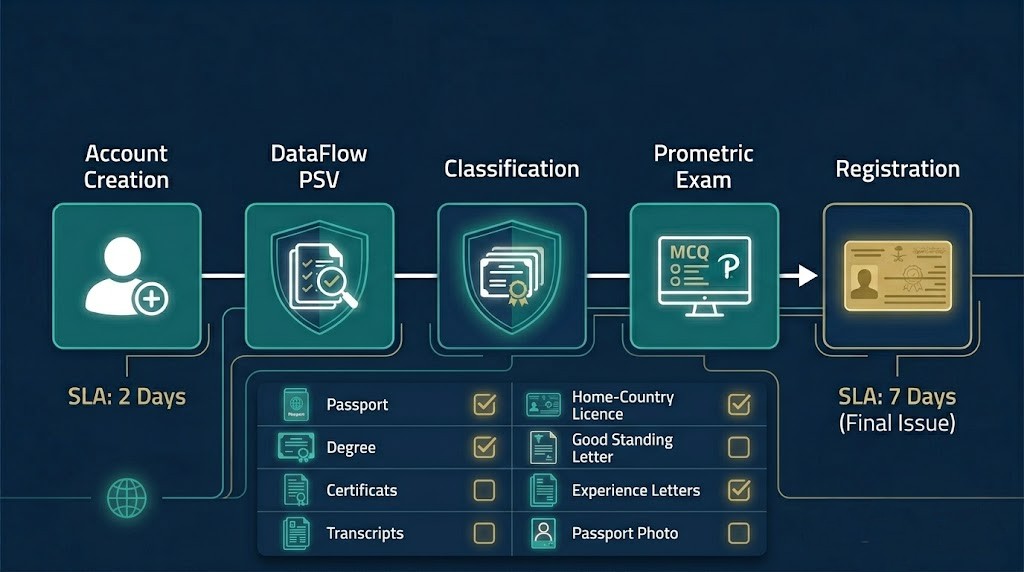
You need passport, degree, transcript, home-country licence, good standing letter, and experience letters. Scan all as clear PDFs before starting.
Prepare your documents before you open the portal. Uploading incomplete or poor-quality scans is the leading cause of “Returned” applications. Here’s the core list:
- Valid passport (all pages)
- Degree certificate and official transcripts
- Home-country professional licence or council registration (NMC, PRC, PMDC, AHPRA, DCI — whichever applies)
- Good standing certificate issued within the last 6 months
- Internship or training completion certificate if applicable
- Signed experience letters on hospital letterhead, confirming job title, department, and employment dates
- Recent passport-sized photo (white background)
One important note: if your qualification doesn’t appear in the Mumaris+ dropdown menu during application, you’ll need to apply for a New Qualification Study (NQS) before proceeding. This costs SAR 300 per qualification and adds time to your application.
Name consistency across every document is non-negotiable. If your degree says “Muhammad” and your passport says “Mohammed,” SCFHS will return your application. Resolve any discrepancies with an affidavit or a corrected document before you start.
Step-by-Step: Creating Your Account and Submitting for Classification
Go to the official Mumaris+ portal and click “Register.” Select “Practitioner” as your account type, then enter your name exactly as it appears on your passport. Use a Gmail or Outlook address — not a work email you might lose access to.
Once your account is active, log in and select “Professional Classification and Registration” from the service menu. Fill in your personal information, contact details, and professional background section by section. Then upload your documents and submit.
After submission, you’ll receive an email to pay the SAR 200 administrative fee. Pay it within one month — the application won’t proceed to SCFHS review until payment clears. SCFHS provides an official step-by-step walkthrough at scorm.scfhs.org.sa if you want a visual guide alongside this one.
How Does DataFlow Verification Work Inside Mumaris+?
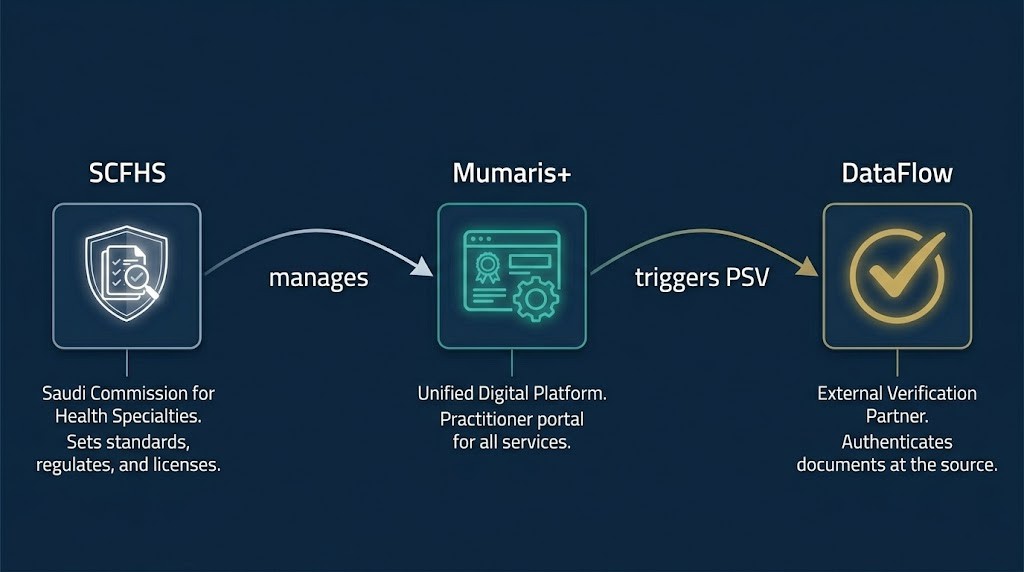
SCFHS approves your application, then DataFlow opens automatically to verify your degree, council registration, and employment. Expect 6 to 10 weeks.
Here’s what that means practically: you don’t go to DataFlow’s website separately and start from scratch. Once SCFHS completes its initial review of your application, it automatically creates a DataFlow case linked to your Mumaris+ account. You’ll receive an email from Mumaris+ with a link to begin the DataFlow portion.
DataFlow then contacts your university, your home-country licensing council, and your previous employers directly to verify your credentials at source. When the DataFlow report is complete, it links back to your Mumaris+ account automatically — SCFHS can then see the verified results and continue your classification.
The most common causes of DataFlow delays:
- Home-country councils that are slow to respond (NMC UK, PRC Philippines, and MCI India can each add weeks)
- Name mismatches between your documents and your passport
- Experience letters without job-specific duties, or with incorrect employment dates
- Low-quality scans that DataFlow cannot read clearly
If DataFlow returns an “unable to verify” result on a specific document, you can resubmit that document with a corrected version. You don’t restart the whole process, but you do lose time. Our DataFlow verification service includes direct follow-up with institutions weekly — it’s the most effective way to avoid the delays that push a 6-week process into 14 weeks.
Which Exam Will You Need to Sit?
Exam type depends on profession. Doctors sit Prometric MCQ plus oral for specialists. Nurses sit SNLE (200 MCQs). Pharmacists sit Prometric MCQ.
Exam requirements are not uniform across professions, and most guides gloss over this. Here’s how it breaks down:
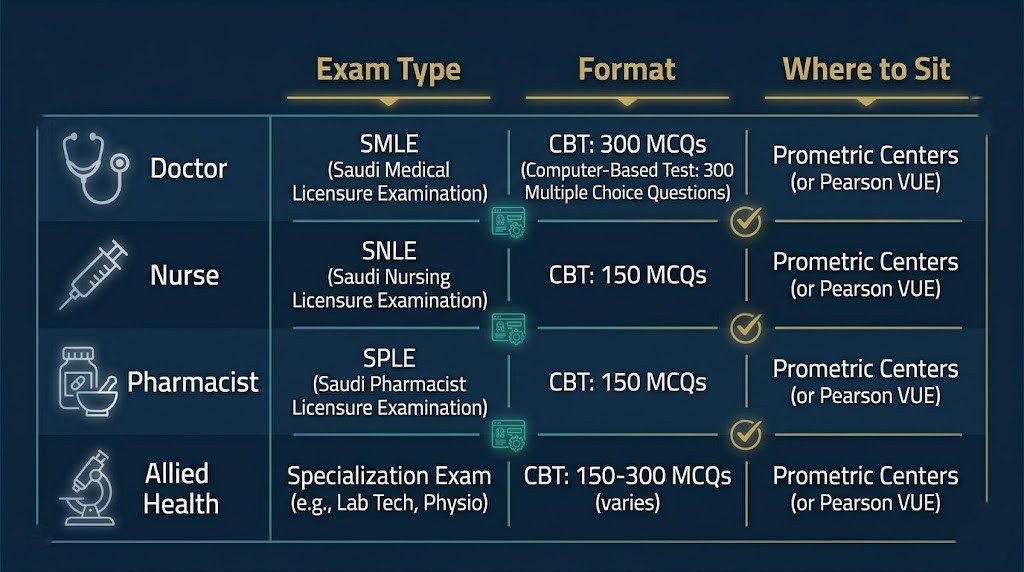
Doctors
General practitioners sit a Prometric written MCQ. Specialists and consultants additionally sit a professional practice oral examination, which runs between 20 and 90 minutes across 1 to 4 stations assessed by an SCFHS-appointed examiner. A foreign postgraduate degree (residency or fellowship) may place you in the Specialist or Consultant tier — SCFHS classification department determines this based on your credentials.
Nurses
Nurses sit the Saudi Nursing Licensure Examination (SNLE), not the general SCFHS Prometric MCQ. The SNLE consists of 200 questions divided into two blocks of 100. It can be sat at Prometric centres both inside Saudi Arabia and internationally. Non-clinical nursing roles (telenursing, education) may not count toward the experience requirements — confirm your specific role’s eligibility before applying.
Pharmacists
Pharmacists sit the SCFHS Prometric written MCQ. Tamheer-type training experience (Saudi government internship programmes) may be accepted toward experience requirements, provided the employer letter includes specific job-description wording. Pharmacists also face a 40-hour CPD requirement per 2-year registration cycle — relevant to factor into your timeline from day one.
Allied Health
Many allied health professions qualify for a direct-decision classification route, which means SCFHS can classify you without requiring an exam if your credentials meet the threshold. Medical device technicians, laboratory scientists, and radiographers each have profession-specific rules — the direct-decision vs exam path depends on your qualification level and experience. If you’re unsure which route applies to you, our SCFHS exam preparation service includes a pre-submission eligibility check.
Once you receive your exam eligibility number from SCFHS via Mumaris+, you can book your Prometric slot at any test centre globally. Don’t attempt to book at Prometric’s website before you have this number — the booking will fail without it.
What Do the SCFHS Application Status Codes Actually Mean?
Completed means approved. Returned means SCFHS needs more information and you can resubmit. Rejected means your application failed and new fees apply.
The Mumaris+ dashboard shows three primary status outcomes for your application, and knowing what each means saves unnecessary panic:
Completed — your application has been approved and processed successfully. Your classification certificate is available to print from the “My Certificates” section in Mumaris+.
Returned — SCFHS reviewed your application and requires additional information or a corrected document. You can resubmit without paying new fees in most cases. Check your registered email for the specific reason before resubmitting.
Rejected — your application did not meet SCFHS criteria. New application fees apply to resubmit. This is distinct from “Returned” and requires understanding why the rejection occurred before starting again. If you’ve received a rejection and aren’t sure how to respond, that’s a situation where a licensing consultancy can save you both money and time.
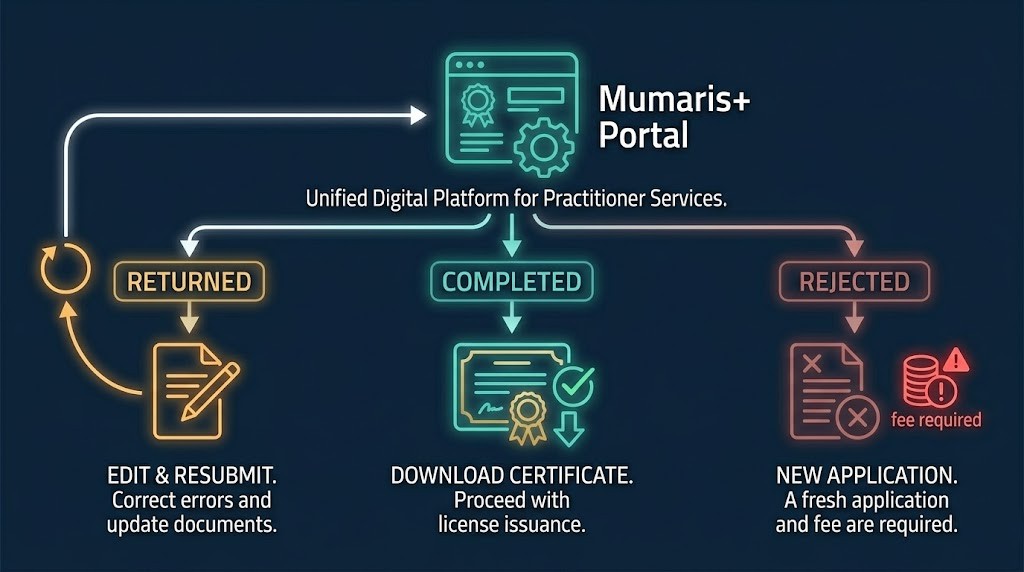
Exam results, separately, take up to 14 working days to be approved on the SCFHS side after you sit your Prometric exam. The result appears in your Mumaris+ account once approved.
How Long Does Each Stage Take? Official SCFHS SLAs
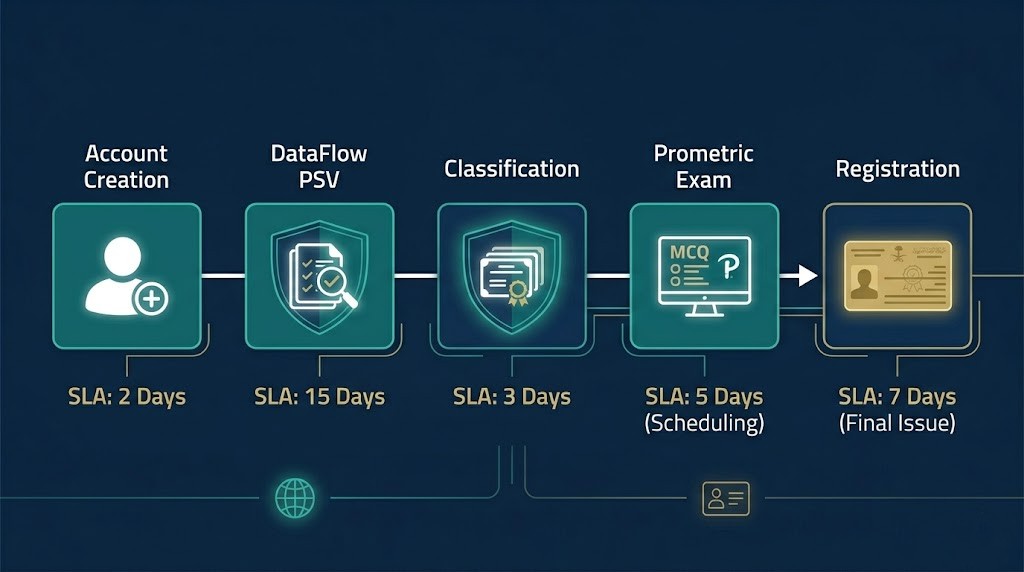
Classification: 7 working days (direct) or 30 days (Prometric-based). DataFlow: 6 to 10 weeks. Professional Registration: 5 working days.
Most articles describe these timelines as “a few weeks.” The SCFHS publishes Service Level Agreements for each stage. Use these numbers to plan your timeline:
| Stage | Official SLA |
|---|---|
| Initial classification review (direct decision) | 7 working days |
| Classification (Prometric-based) | 30 working days |
| Classification (practical evaluation) | 35 working days |
| DataFlow Primary Source Verification | 6–10 weeks |
| Professional Registration | 5 working days |
| Exam results approval | Up to 14 working days |
| Renewal processing | 7–14 working days |
End-to-end, a first-time applicant should plan for 5–8 months from Mumaris+ account creation to active registration. Running DataFlow and exam preparation simultaneously — rather than sequentially — cuts that timeline by 6 to 10 weeks.
How Much Does SCFHS Mumaris+ Registration Cost in Total?
Total cost: SAR 2,500 to 4,000. This covers SAR 200 classification, SAR 400 to 900 DataFlow, the Prometric exam, and SAR 1,140 Registration fee.
Here’s the breakdown by stage:
| Stage | Cost |
|---|---|
| Classification administrative fee | SAR 200 |
| DataFlow PSV (varies by document count) | SAR 400–900 |
| New Qualification Study (if required) | SAR 300 per qualification |
| Prometric exam | Approx. SAR 1,000 (varies by location) |
| Professional Registration (total) | SAR 1,140 |
| — Service fee | SAR 900 |
| — Administrative fee | SAR 100 |
| — Registration service fee | SAR 140 |
Fees can be paid through the Mumaris+ portal using SADAD (biller code 129 for SCFHS), Mada, or credit/debit card. Keep your payment receipts until registration is confirmed.
One cost most guides don’t flag: if your registration expires without renewal and you miss the 31-day grace period, a fine is issued. Apply for renewal up to 3 months before your expiry date to avoid it.
Common Mistakes That Delay or Reject Mumaris+ Applications
A pharmacist from Egypt applied with an experience letter that listed only job titles and department names. No duties, no patient contact descriptions. DataFlow verified the employment but SCFHS returned the classification application because the experience didn’t meet the role-specific wording requirements. A revised letter from the hospital HR resolved it — but it added 6 weeks.
That situation is avoidable. The most common errors:
Name mismatches. Every document must match your passport spelling exactly. If they don’t, get an affidavit or a corrected certificate before uploading anything.
Wrong classification tier. Selecting “Specialist” when your credentials qualify you as “Registrar” — or vice versa — triggers a review that adds weeks. If you’re unsure which tier applies, check the SCFHS classification criteria or ask us before submitting.
Uploading extra documents. SCFHS only needs documents relevant to your application stage. Uploading additional unrelated certificates actually slows evaluation.
Missing the SAR 200 payment window. You have one month to pay after submitting. Miss it and the application closes — you start again.
Booking Prometric before receiving your eligibility number. The booking will not process. Wait for the number to appear in your Mumaris+ account.
What Happens After You Get Your SCFHS Licence?
Your Professional Registration is valid for 2 years from the date of issuance. Renewal happens through Mumaris+ and requires proof of Continuing Medical Education hours completed during that period.
The required CPD hours per 2-year cycle vary by profession:
- Doctors: 60 hours
- Pharmacists and Specialists: 40 hours
- Technicians: 20 hours
If you completed CPD courses outside Saudi Arabia — online webinars, conferences, or e-learning programmes — you can add these to your Mumaris+ account through the Mustamir recognition service. Most guides skip this detail entirely, but it matters if you’ve spent time working outside the Kingdom.
One situation worth planning for: if you leave Saudi Arabia for more than 180 days, your re-entry path depends on how much time has passed since your last practice. Less than a 2-year experience gap and your classification remains valid — you re-register. More than a 2-year gap and re-classification is required, including a repeat exam in most cases. Check your status before you rebook flights.
When Does It Make Sense to Use a Licensing Consultancy?
The Mumaris+ portal is manageable if your documents are clean, your name is consistent, and your qualification is on the SCFHS-approved list. Many applicants complete the process independently without issues.
The cases where professional help pays for itself quickly: DataFlow resubmissions where the institution isn’t responding, restricted classification removal, re-classification after a KSA gap, and applications where the qualification isn’t in the Mumaris+ dropdown. Running DataFlow and exam preparation simultaneously — rather than waiting for one to finish before starting the other — also requires knowing exactly when to trigger each step.
Our Saudi licence application service manages the full process, including weekly DataFlow follow-up and pre-submission document audits. If you’re not sure where your application stands or whether you qualify, start with a free assessment.
Frequently Asked Questions
Q: Can I start job applications before I pass the Prometric exam?
A: Yes. Professional Classification is granted before the exam in some cases, and employers in Saudi Arabia routinely issue conditional job offers to applicants who are classified but not yet registered. Your Mumaris+ classification certificate is enough for most recruiters to begin the process. Registration — the step that activates your licence — happens after you join your employer and obtain your Iqama.
Q: What happens if my DataFlow report says “unable to verify”?
A: DataFlow issues an “unable to verify” result when it cannot confirm a document’s authenticity directly with the issuing institution. This usually means the institution didn’t respond within the verification window, not that your document is fraudulent. You can resubmit with additional supporting evidence — a notarised copy, a direct letter from the institution, or an alternative contact for the verification team. Don’t start a new DataFlow case from scratch.
Q: My registration expired 18 months ago. Do I re-register or re-classify?
A: It depends on your experience gap. If you practised continuously up until expiry and are returning without a break exceeding 2 years, you apply for re-registration. If there’s been a gap of 2 years or more without active clinical practice, SCFHS requires re-classification — which includes a repeat exam. Check the exact dates and contact SCFHS or a licensing consultant before submitting, because choosing the wrong service wastes fees.
Q: Can volunteer work from my home country count toward SCFHS experience?
A: Yes, according to the SCFHS official FAQ, volunteer experience can be accepted provided it is validated properly. The experience letter must come from an official body and include the role, department, and hours worked. It’s worth flagging this to SCFHS at the classification stage rather than assuming it won’t count.
Q: How do I add foreign CPD hours (online courses, webinars) to my Mumaris+ account?
A: Log into Mumaris+, navigate to the CPD section, and submit the hours through the recognition service. Courses from accredited international platforms and webinars from recognised professional bodies can be added. The SCFHS FAQ at scfhs.org.sa/en/mumaris-faq confirms this and outlines the steps for adding hours obtained outside the Kingdom.